Well it’s past midnight and a day of the week that ends with ‘y’, so that means it’s time for another Lurker changelog…
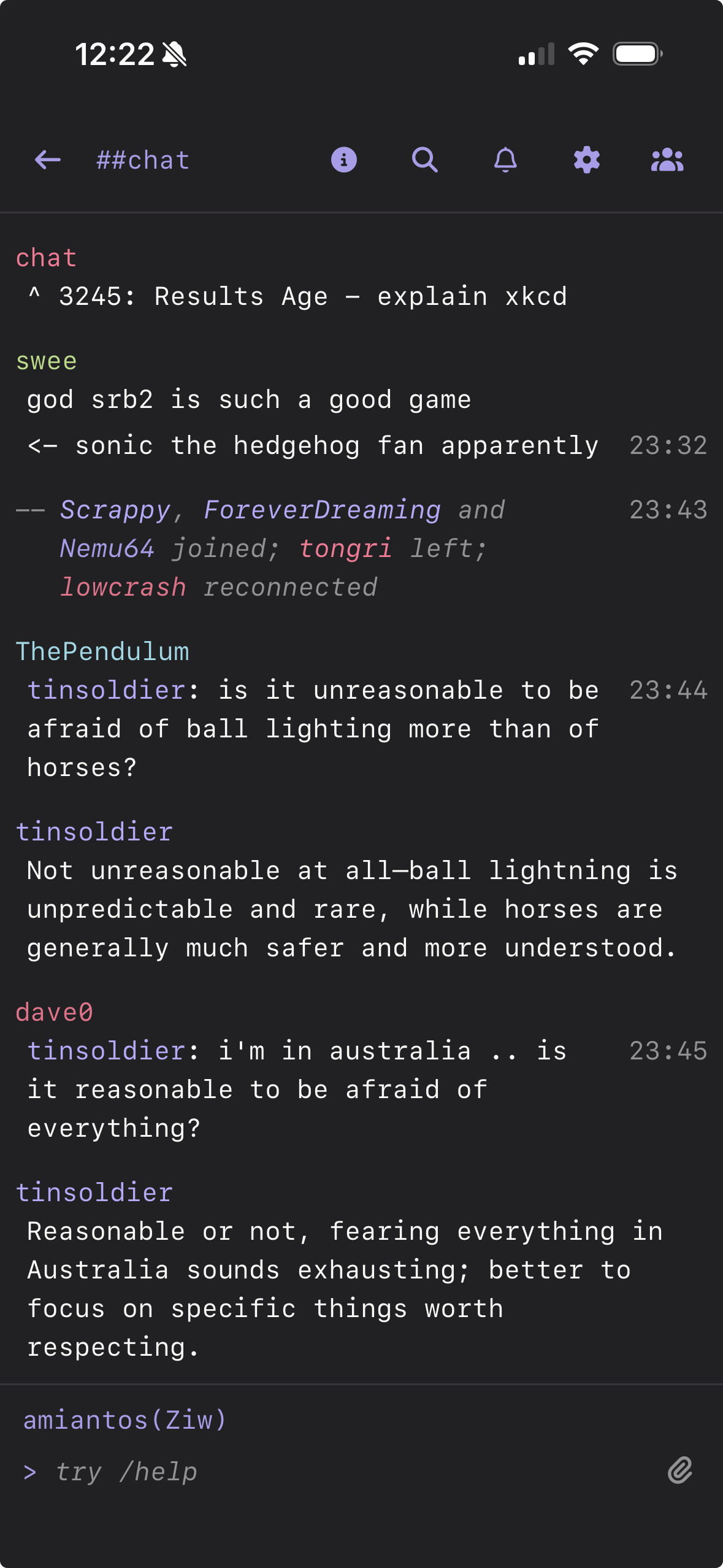
- Added new compact message list format for mobile devices which is a bit more ‘modern’ for space savings. There is a configuration option where you could use this mode on desktop.
- Added new settings to ‘collapse’ repeated nicknames and timestamps in chat. Collapse repeated timestamps is on by default, but not very noticeable unless you set your message list timestamp format to
HH:mm
- When tapping on messages in your Highlights or Search modals, you are now properly directed right to the message in the right buffer, no matter how old the message is.
- Removed nick coloring in buffer list, as it was confusing after adding unread/highlight channel name coloring.
- Bug fix: when reconnecting to a disconnected server, buffer history did not load properly in existing buffers.
- Disabled printing channel topic in the channel when joining the channel, as this led to a lot of clutter in the channel history.
- Settings menu has been overhauled with improved search and setting compartmentalization, laying the groundwork for more bespoke settings panels (like an interactive theme editor…)
- Date has been added to the timestamp shown on messages in the Highlights and Search modals.
This is all now live on my instance, be sure to refresh next time you load it up to make sure you get all the new stuff.
Screenshot of new compact chat mode for mobile.
Today I made the final push to get Lurker to 1.0.0-beta!!! Very exciting. Here’s what I did…
- Added
/reconnect command to reconnect to a sever after /quit
- Added ability to escape
/ commands at the start of input like //quit for example.
- Fix: iOS keyboard closing when tapping nick suggestions (third attempt)
- Added “User Notes” feature, a little notepad for keeping notes about your IRC friends
- Added “Save Message” feature, so you can bookmark any message for later reference. There is a new bookmark icon in the main footer bar to access all your saved messages.
- Added network config option to run commands after connecting (I’m using this to log in to
idleRPG on libera.chat automatically)
- Fix: switching settings panels was not scrolling to the top automatically
- Added page up / page down keyboard shortcut support for scrolling the message list
- Added ability to reorder networks; this is under ‘networks’ section in the settings panel
- Added “system buffer” you can access by clicking on the Lurker name in the top left of the client, this shows some live debug logging for what’s going on in Lurker
- Added input support for mIRC colors + formatting; a palette picker can be turned on optionally in settings under
input.show_format_button and keyboard shortcuts Ctrl/Cmd+B/I/U work with selections in the input bar
- Fix: alt message lines lacked hover effect
- Added full settings and chatlog export and import, so your data is fully transferable between lurker instances (and can be backed up)
- Added proper docker image building and updated README instructions on how to use it
And that’s it! We’re in the 1.0.0 beta! We’re feature complete! 
Got some stuff set up so that Lurker can be deployed to a digital ocean droplet in a way that is practically idiot proof…
After officially minting 1.0.0-beta I took a day to breathe (in which I made the MCP integration, so not really) and then got back at it. Since the last changelog post, this is what has been added or changed… (Note, I’ve moved from using vikunja for card tracking over to GitHub issues now that the project is public.)
- MCP server - there is now an MCP server at
/mcp, you can create an API token for it in the “api tokens” portion of the settings panel. You can use the MCP with something like Claude in order to allow an AI to read and/or remotely control your Lurker instance. This is meant to give a basic introductory vector for something like ‘plugins’…
- In the
integrations/autonotes folder in the repo, there is an example web app that uses Claude API + Lurker MCP to automatically generate biographical notes for chat participants and saves / updates your Lurker user notes for you, as a demo of using the MCP for a real use case
- The entire project has been migrated from Javascript to TypeScript.
- Added instructions and tooling for a one-shot Digital Ocean Droplet deploy that handles SSL setup and more.
- Toasts properly debounce if a large flood of messages come in at once (like if you message ChanServ “HELP”) so you no longer get huge amounts of toasts
- Fixed: sending a /msg from another buffer did not clear the /msg from the input bar of the originating buffer
- Account panel in settings shows your username, in case you forget it
- Fixed: custom context menu was preventing in-browser right click from working in the message list (so you couldn’t just copy part of a message)
- Big improvement to how toasts/notifications interact with backgrounded browser tabs, this should feel a lot more natural now as to when Lurker decides to send toasts or push notifications. The main fix here: you do not get toasts/sounds for buffers you are active in.
- The desktop @ nick suggestion menu has been overhauled: the order makes more sense, it uses nick colors, and the expected keyboard affordances has been added (like using arrow keys and tab/enter to select).
- Fixed: highlight matching was too broad by default and would match words embedded in URLs.
- Fixed: mouse hover highlight was changing foreground text color on alt-colored rows which felt weird
- Fixed: clicking ‘save’ in server settings no longer forces a reconnection to the server, you have to trigger reconnection manually if you want it
- Added “close” affordance to the buffer context menu for DMs and Channels
- Added more time formatting options in the settings panel, so filthy Americans can use 12-hour time if they want
- Improved the mIRC color picker to support foreground and background colors
- Added
||spoiler tag|| support, where if you type and send a message with || marks surrounding words, it will automatically wrap those in the same fg/bg colors to turn them spoilered text you cannot read by default. Inside Lurker, spoiler text shows with a click.
- Added
/ns and /cs shortcut commands to message ChanServ and NickServ respectively
- Added Slack-style emoji picking, if you type something like
:bo you will get emoji suggestions in the status bar, which you can navigate via keyboard just like the @ nick suggestion menu… neato!
That’s it! All these changes are about to go out to irc.bradroot.me if you are over there.
I’m starting to run out of GitHub issues, which is a good thing…
- Bare
/quit now uses the same default quit message as a system-shutdown disconnect
- When channels appear in the message list, you can click on them to join them (or open the buffer if you’d previously joined and parted a channel)
- Added colored bars that appear at the top or bottom of the buffer list, if you have unread buffers that are above or below the fold in either direction
- Mobile: drag to reorder now requires a tap and hold to trigger, as to not conflict with scrolling
- Mobile: removed attempt at using long press to show context menu on messages, now it’s using one tap to ‘hover’ which shows the three dot menu, which is then clickable to get the menu
- Fixed issue where larger font sizes could cause the interface to overlap in areas.
- Added
look.font.size.mobile option to set a unique font for the mobile layout, in case you use a very large font on desktop but want a more normal one on mobile, idk
- Fixed issue with tablet layout being pretty broken on iPad, and trying to solve a weird animation issue in mobile Safari.
- There is still some funkiness with mobile and iPad interacting with the iOS keyboard. I am not sure how to sort it out, or if it can be sorted. What we have now is functional, but a real solution long term will be making a proper native iOS app for both devices…
Seems like the beta is wrapping up…
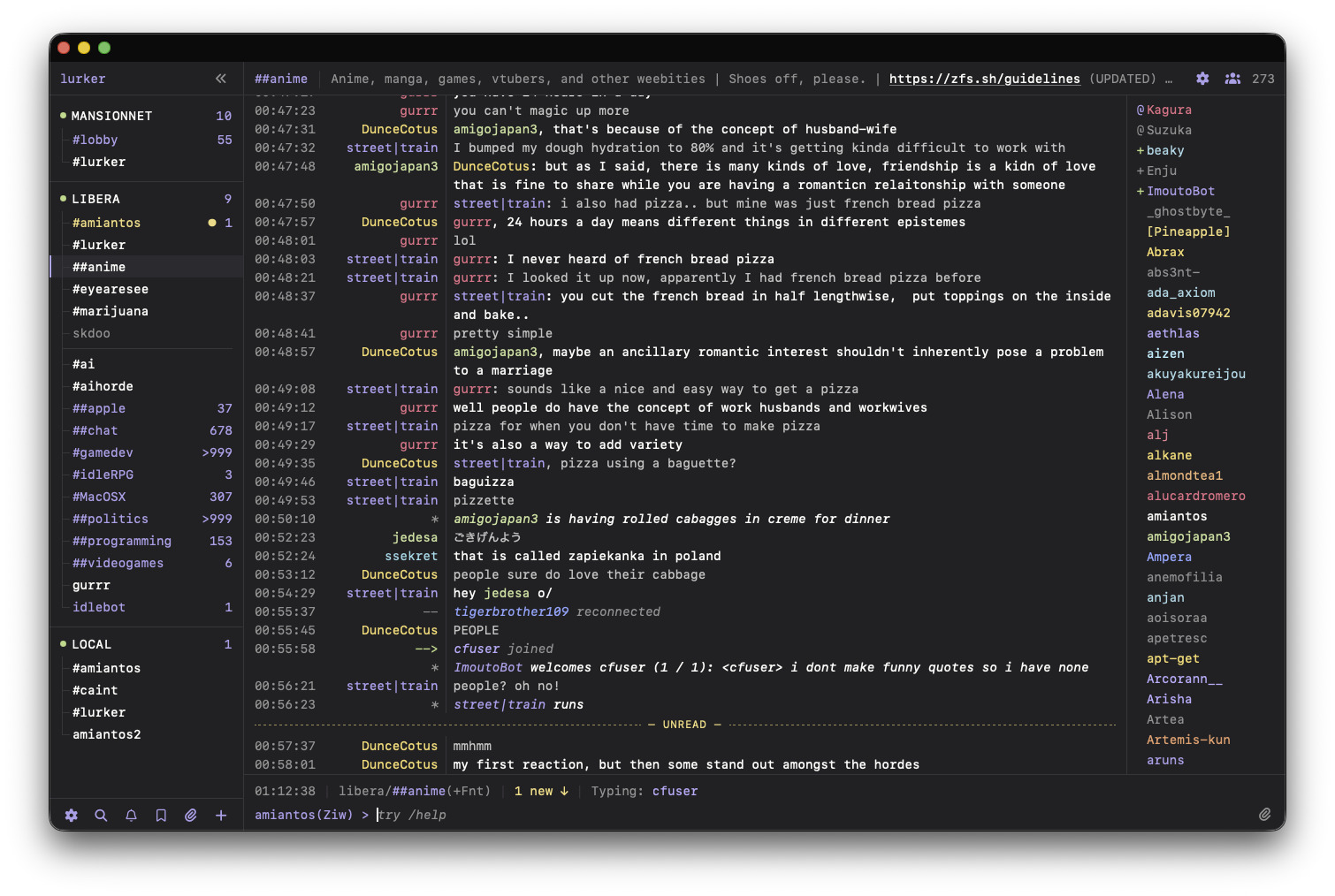
It’s been a while since I posted a screenshot, here’s what lurker looks like at this point in history.
Some more changes to the 1.0.0 beta for Lurker, live on irc.bradroot.me now
- Fixed: filter-only searches were not working (like “from:amiantos” with no query)
- Buttons in the topic area of the server buffer have been redone a little, there is now visible disconnect/reconnect button and the server list button is more explicit on desktop.
- On small displays, when switching buffers using keyboard shortcuts, the buffer list now keeps the selected buffer in view.
- Fixed: highlights modal as strange ‘load more’ button unlike other modals
- Server modal now uses the same modal styling as other modals in the app
- Toast styling has been improved; there are now unique accent colors depending on the type of toast being shown.
- Context menu styling has been improved (still not 100% happy with it though)
- There is now a nicer
/whois screen to show user information as well as user notes, the design of this is preliminary and not particularly nice at the moment
- Fixed: buffer history was not loading when clicking on a toast or push notification
Took a little break over the holiday weekend, but tonight I was back at it…
These changes just went out live to irc.bradroot.me and the docker image
- Added: Contributor Jozef added sub-nav to the settings menu in the Appearance section. Nifty!
- Added: you can now
/clear a buffer, which hides all previous message history; can be undone via in-buffer marker showing the clear point.
- Changed/Added: mIRC colors are now on-theme for the default Lurker theme, and there is a new configuration option where you can customize them yourself as part of your theme settings
- Fixed: if you used mIRC colors and the foreground and background colors were the same, they turned into gray spoiler tags in chat; this has been fixed so now they appear as the selected colors, maintaining the clickable spoiler tag ability
- Fixed: reordering pin buffers stopped working if you
/close’d a pinned buffer.
- Fixed: ignored user still triggered unread markers on buffers in the buffer list
Another day, another round of Lurker issues closed… this’ll go out to irc.bradroot.me shortly…
- Fixed: there were a variety of layout issues on mobile, from there being extra spacing under the input area on iOS, to the input area disappearing on Android; hopefully those issues have been resolved in this build
- Fixed: typing notifications were appearing for users in your ignore list
- Suggestions, in general, have been improved.
- The compact nick suggestion bar has been brought into feature parity with the emoji suggestion bar, meaning that it now responds to the keyboard and is styled similarly now.
- The
@ triggered nick suggestion panel is now available on mobile, and is always available on desktop even if you turn on the compact nick suggestion bar.
- The mIRC color picker now works on mobile, basically (the touch targets are a bit small)
- On desktop, when hovering buffers in the buffer list, the kebab menu no longer obscures the unread counts and other information on the item.
- Fixed: timestamp collapse was not working properly in compact message mode
- Fixed: irc networks that pushed chat history when unrequested could add duplicate messages to the db; this has been fixed and the chat history sent is discarded. If there is a request for it in the future, chat history support can be added properly.
- Improvement: the auto-away system now ties into the same client presence paradigm as push notifications, meaning that you can leave a client running somewhere, but if it goes idle, you’ll still go into afk mode after 5 minutes; I based this decision on seeing what happens when testers leave their clients idle, it seems like a misconfiguration for auto-away to not kick in automatically in these scenarios.
Despite daily effort, it seems the list of issues on GitHub never gets any smaller… steady as she goes, I suppose 
I have this funny feeling the auto-away system worked this way originally and I didn’t like it and changed it to the way it was before now… hmm… I guess we’ll see…
Small changelog for tonight, this will go live on irc.bradroot.me shortly…
- Fixed: font sizes were meant to be uniform across the app (with some exceptions), but they weren’t, until now
- Dependencies: numerous minor dependency updates as well as migrating to Express v5.
- Fixed: pressing enter was selecting autocomplete suggestions on mobile and desktop, which could cause issues when using the compact nick or emoji suggestion strips; now enter is defended as only for submitting messages (and shift+enter for new lines).
- Fixed: depending on font size and display size, in-buffer client-side markers (like date, away status, unread marker) did not wrap gracefully; now they do.
- Added: channel operator commands have been added to the nick list context menu.
That’s it! Have fun
I’ve been working on the lurker.chat service foundational stuff and haven’t made a lot of updates to the core lurker experience… until today!
- Added identd support
- @skdoo contributed a PR to improve network actions, they are now accessible from a kebab menu as well as making the channel list more easily accessible.
- Fixed: Cmd+K jump menu was matching on network names, which is not useful and sometimes harmful
- Fixed: when set auto-away, the date for the auto-away is set to the time you initially went idle, not when the away is started, this should make this feature less confusing.
- Changed: changed the default auto-away time from 5 minutes to 15 minutes, I think this is better as well.
- Updated default quit message link to show https://lurker.chat instead of the GitHub url.
- Added
# triggered channel auto-complete menu similar to the @ menu for nicks.
This is live on irc.bradroot.me already, you may need to refresh your client to see the changes.
Well, we hit a huge milestone today, the production lurker.chat services were launched into beta and I’ve moved everyone who was on my self-hosted irc.bradroot.me instance over to the official roswell.lurker.chat cell… which is just crazy to think about.
There weren’t a lot of changes to Lurker itself between the last post and today, just…
- Admins can now ‘pause’ accounts on their instance, which prevents them from connecting to irc networks and displays a banner at the top of their client saying they should speak to an administrator; they can still retrieve their account data via export in this state.
- Admins can configure
LURKER_SECRET_KEY env value which will enable encryption-at-rest for sensitive user information (like sasl account & password, and network-specific on-connect command lists
- Fixed: user data export/import could crash all your network connections; this has been fixed and the data export/import system has been improved considerably; and it has been dogfooded by myself and beta testers
- Improvement: when using Alt+Up/Down, etc, to move between buffers on small displays, more buffers are kept in view so you can see upcoming buffer’s unread state.
- UX: The SASL user and password fields in the network editor have been moved out of advanced settings, since they are often required in some contexts, and are just a good idea to use in general.
That’s it! There were a lot of other changes to the lurker client but most of the rest were in support of cell mode for the service. The client didn’t need a lot of changes, so it’s nothing that ‘bloats’ the standalone client in any way. Keeping it light over here
Okay, that’s it, time to celebrate.

A new lurker update has hit, this is live at app.lurker.chat now…
- @skdoo added an optional lightbox option for loading images in-client, it’s under Settings → Chat → Image Viewer, or search for
chat._image_modal
- Adjustments and improvements to mobile interface & input bar, namely that on mobile the input bar placeholder shows the current channel name, so that is more visible than before.
- If you load lurker while disconnected from networks, the buffers for those networks will still appear and be accessible now.
- If you submit a /command that is unrecognized, you now get a toast and a better message in the server buffer explaining what command was unrecognized.
- You can now tap on the
> mark in the input area to bring up a list of previously submitted inputs, this allows you to access this information on mobile now (before it was only on Up Arrow presses on desktop).
- There is now a ‘jump to unread’ button in the status bar if the unread marker for your current buffer is off screen. Also, improvements to the ‘jump to recent’ button have been made and it should appear in more situations than before.
- Hopefully fixed a bug which would result in large chat backlogs from not loading into stale on-screen buffers. Hard to explain this one, but you’ll know it if hasn’t been fixed and you see it.
- Added improved message action bar overlay to replace the kebab / context menu overlay. This looks really nice! Adds new ‘reply’ button which auto-fills the "nickname: " bit in the input for you.
That’s it! Got through a lot of issues tonight and did the first production update and nothing exploded.
It’s that time again! Time for some minor lurker updates, these changes are live on https://app.lurker.chat now.
- Fix: the icon for toggling the nicklist was missing, it has been found
- Mobile: a lot of fiddling went into simplifying the mobile topic bar for a buffer
- Fix: ignored senders were not being excluded from search
- Added: you can now search and filter highlights just like you can in regular search
- Fix: Enter is now a valid keypress on any suggester type that uses a fixed prefix (like
@, #, and :) which fixes some headaches on desktop around this behavior.
- Fix: the “jump to unread” functionality added yesterday now works properly for large quantities of unread messages.
- Fix: in cell mode (on app.lurker.chat), the Settings->Account panel now shows your actual account email address, and links to a placeholder billing page.
- Added: on app.lurker.chat you can now request a password reset
That’s it!
Behind the scenes, work continues on getting billing set up for app.lurker.chat, tonight I got all the main subscription flow stuff working, just need some more QA and some other accoutrements before making it live.
Big milestone today, the https://lurker.chat paid service has soft-launched!
Several beta users have already switched their free accounts to paid accounts (totally optional btw).
Last night I ended up upgrading the infrastructure hosting the initial cell preemptively, which allowed me to do a full test of the “somehow a cell and all its storage blew up, let’s recreate it as fast as possible” process… and it worked! It was a bit slow, but it was 100% up to the moment restoration of where the cell was right before it was destroyed. Pretty cool, and great peace of mind for me.
There’s some more polish I want to make to the client and to the billing infrastructure before I start doing the rounds, letting all the usual FOSS places know about the app. Really trying to “take my time” on this project, though it probably doesn’t seem that way from the outside.
Another big milestone today, I officially retired the ‘beta’ label for Lurker itself, so we’re at 1.0.0 officially now. Is Lurker absolutely perfect? No! But it’s pretty close…
Here’s what I did today…
- Backend: when a lurker instance with a lot of users comes back online, in theory their reconnection to networks should be staggered to reduce the risk of flooding a network.
- Fixed: “Save + Connect” button not connecting if user has unchecked ‘connect automatically’ in network settings
- Fixed: when you close a buffer on mobile, you will now be properly returned to the buffer list instead of a blank screen.
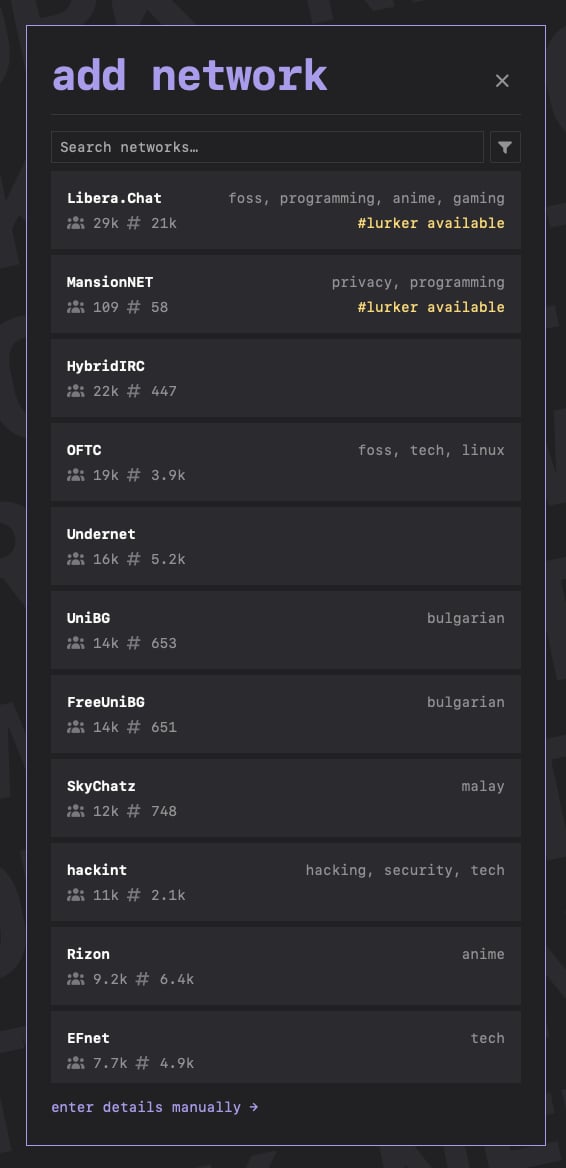
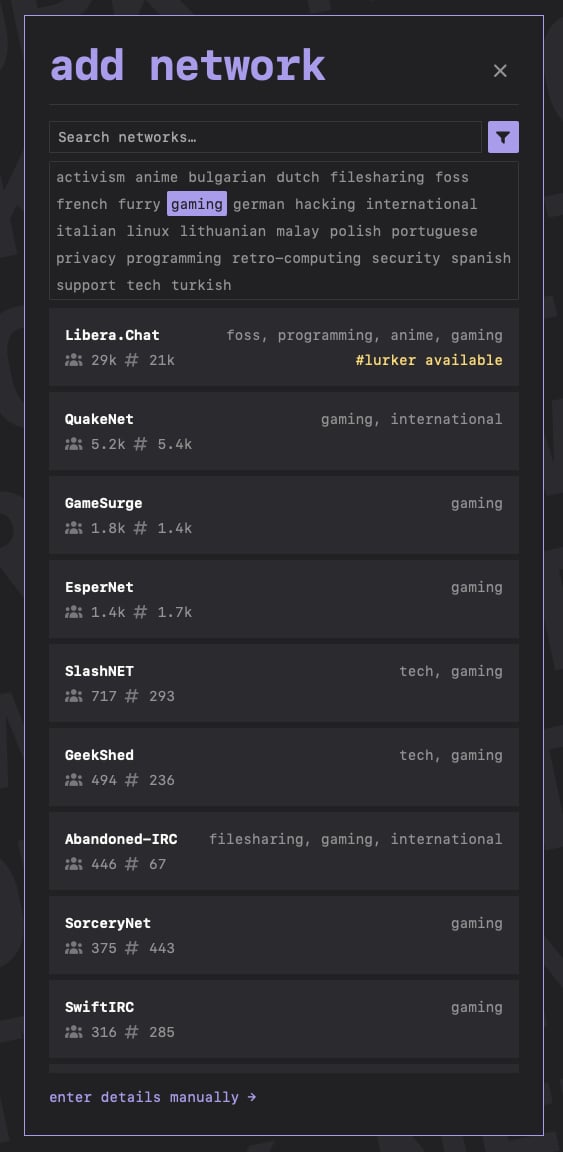
- Added: the add network screen now has a nice network picker with filtering/search and tags. Tags could use some fleshing out…
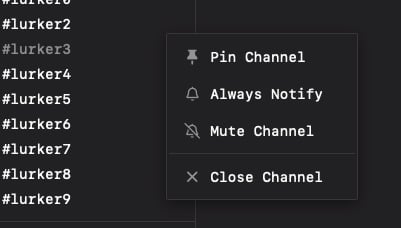
- Added: you can now ‘mute’ a channel to hide the unread count from that channel in the buffer list.
- Improved: the design of context menus has been changed for the better (I think).
- Improved: on mobile the channel name now shows in the status bar, and your nick appears in the input bar; this makes more sense to me as the channel name is more relevant and your own nick isn’t as important.
- Improved: the ‘jump to unread’ button will vanish after a period of time so as to not be distracting. Still feel like I am dialing this one in…
- Changed: the image lightbox option that @skdoo built is now turned on by default, it can be turned off in settings.
- Improved: the client+server PING PONG now for more reliable offline client detection in the hopes of making auto-away more reliable.
- Improved: the maskable icon used for android PWA mode has been redone to fit in the circle better.
That’s it! With that, lurker hits 1.0
Here’s some screenshots… new network selector…
Phew! Today I decided to post lurker over on reddit, and the response has largely been very positive.
I ended up pushing out a new update to app.lurker.chat tonight after some rapid-fire work to fix some bugs a user encountered upon joining DALnet. Here’s the changelog…
- Fixed: lurker was sending typing status to servers that did not support it, causing an error message flood. now lurker properly pays attention to server support for this feature before trying to use it (which it was already doing for other features like MONITOR, etc).
- Fixed: if you tried to join a channel that was restricted in some way (invite only, registered nick requirement, etc) lurker would silently fail and end up in a weird state. This has been resolved, you get a proper toast explaining why you could not join the channel now.
- Fixed: on some networks (cough DALnet cough) the channel name relayed to clients is not normalized by the server, which could cause the creation of duplicated buffers in the buffer list and a general mess. This has been fixed, and a db migration was put in place to fix historical data that had this issue.
- Fixed: the server response to commands like
/time, /version /admin and so on were being swallowed and not piped into the server buffer, this has been fixed.
- Added
/slap command
- Added support for a bunch more slash commands like
/op /deop /ban /cycle .. all sorts of stuff, check /help for more.
- Improvement: you can now click on yourself in the nicklist to see your whois profile as well as leave notes on yourself
That’s it for today! See ya next time.
Minted a new version today, Lurker v1.0.1 is out, with an annoying visual bug in it that I need to fix tomorrow… here’s the changelog since the last push.
- Fixed: in standalone mode, invite links sent to other users were malfunctioning; this has been resolved and invite links should now work properly.
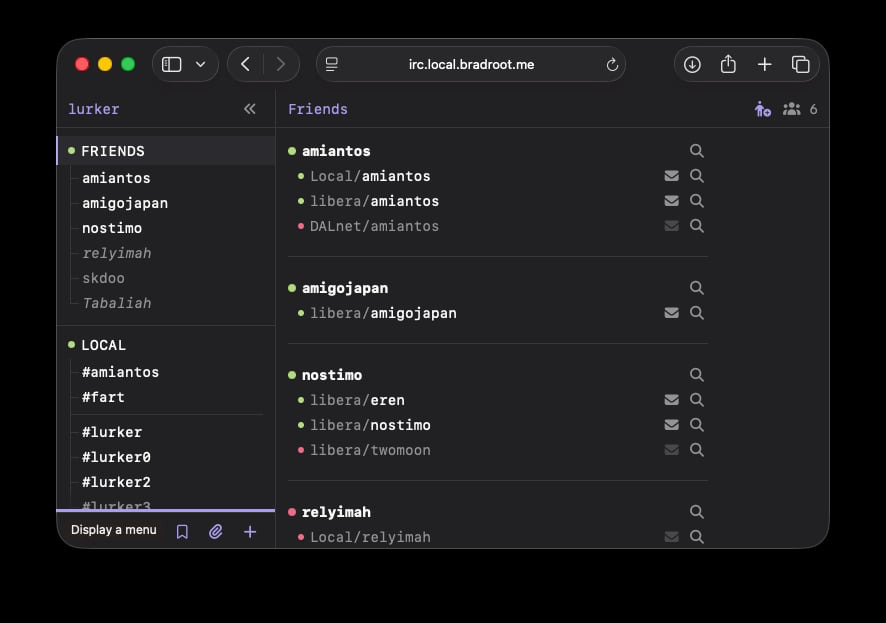
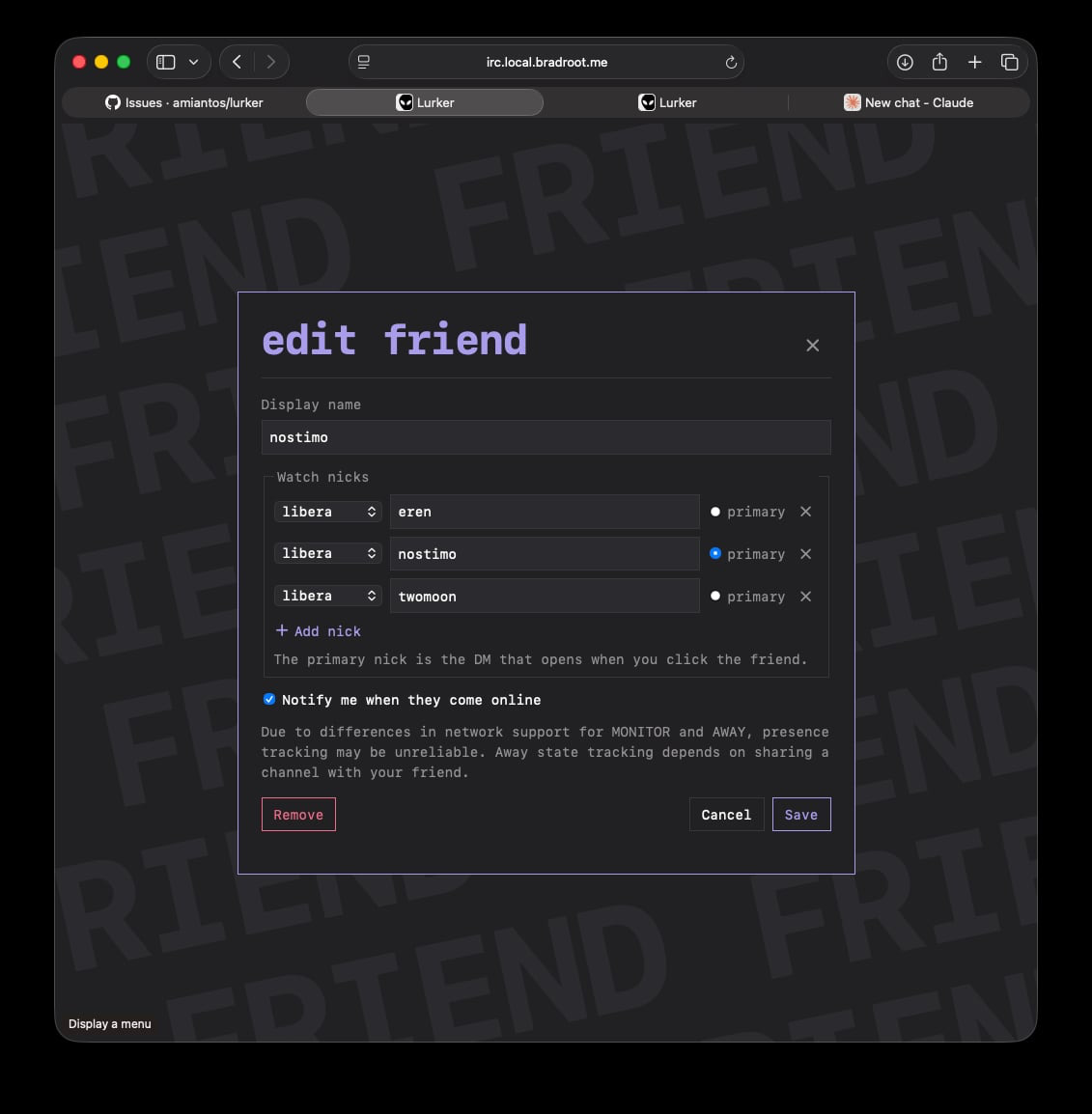
- Added: there is now a “friends list” feature where you can add people to a cross-network friend list. this has some nifty extra functionality for keeping track of friends with multiple nicks, across multiple networks.
- Added: there is now an explicit ‘send message’ button in the input area, which helps mobile users / adheres to mobile UX standards
- Added: you can now uncheck “Only allow trusted certificates” in the edit network modal, to allow you to connect to networks with expired or self-signed certificates. Use at your own risk!
- Fixed: nicklist scroll did not reset on buffer change, so you could end up in scenarios where the nicklist looked invisible when switching between populated to unpopulated channels; this has been resolved
That’s it! These changes are live on app.lurker.chat now as well.
Screenshot examples of the friend list feature…
I pushed some updates out to app.lurker.chat, so might as well write a changelog. This is all on the road to 1.0.2, mostly just a bug bash but we got some UX changes.
- Fixed: in the last update, some status bar styling was broken, this has been fixed.
- Improved: some of the status bar elements have been shortened to make life easier on mobile and to just look better in general.
- Improved: the image viewer modal now supports pinch to zoom.
- Improved: modals across the app have been restyled to a cleaner appearance (while hopefully not losing all character).
- Fix: own nickname changes were not automatically updating the nick shown in the status bar, this has now been resolved (by a first time outside contributor).
- Improved: even more server commands print properly in the server buffer:
/links /info /whowas /help and /whois
- Changed: since
/help is a server command traditionally, the lurker-specific command cheatsheet is now at /commands
- Fix: nicknames in the friend list were not getting colored properly for their unread state, this has been resolved.
- Fix: if you added an offline friend to your friend list, on a server that supports MONITOR, they would appear as online; this has been resolved.
- Fix: Alt+up/down arrow shortcut would stick inside of networks, while Shift+alt+up/down arrow would jump between networks; this behavior has now been unified, both shortcuts jump between networks.
That’s it for now! Some more less fun fixes in store for v1.0.2. Then we’ll be onto v1.1.0 which will have more feature additions.